Building HiChicken
With all my projects, even as I lean heavily on AI for code, I'm trying to learn and understand things better. For this project: Slack app development, multi-tenant architecture, payment processing, and getting a product to deployment.
We used Slack at OpenAI, and, while I was at first resistant—having become accustomed to Google Chat, I soon fell in love with spamming custom emojis to teammates and looking through company threads to see what was going on. We also used a fun bot, HeyTaco, which is one of many recognition bots like Donut or Kudos, where you can send thanks to coworkers for helping you out or for a job well done. I quickly became addicted to giving and receiving Tacos as well.
When I left OpenAI and started at my family's mid-sized manufacturing company, I missed this little bot, and looking to add it to the Slack space a few friends and I share (Atkins and Pearce does not use Slack....yet), I was shocked to learn that OpenAI had been paying $3 per user per month! Look they may have eventually received a bulk discount (and the employees do love it: Evidence A: me), but that seemed pretty steep.
It might not sound steep, but there were about 350 people when I joined in 2023. ~$12K a year isn't crazy I suppose. But now at 3500 users, do they have a $100,000+ yearly HeyTaco bill?
OpenAI probably can afford that but my free Slackspace with John and Seb could not, so I thought, might be easier to just build one myself. So HiChicken was born. I'm realizing with this and go/links, I am clearly a fan of the little conveniences of big tech. Maybe I will make recreating Memegen my next project.
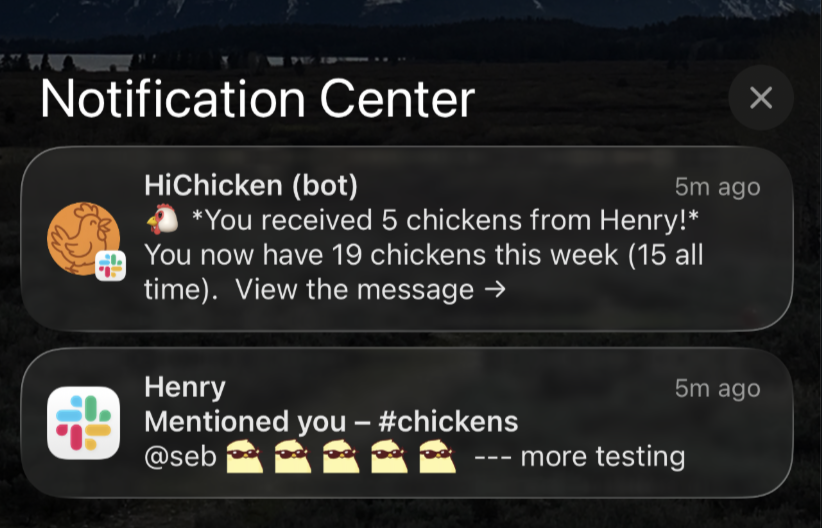
HiChicken is a team recognition bot for Slack, and well—it works like Donut, Heytaco, Kudos. It listens to Slack for emojis and lets peers on a team give appreciation and earn team rewards. React to someone's message with a chicken emoji, they get a chicken. @mention them with a chicken emoji, they get a chicken. Track chickens. Redeem chickens for rewards. (I also made it so you can add custom chicken emojis for fun.)
Check it out: hichicken.app
I used Claude Code and Railway, and it was a surprisingly involved project. And I tried to chunk it into manageable pieces. Getting a slackbot to listen for emojis. Logging users and chickens to a database. Adding custom emojis. Setting up the web portal and rewards store. Getting authentication to work. Adding multiple workspaces. So:
What's in the BOT?!?
Recognition
- React with a chicken emoji to give recognition
- Everyone gets 10 chickens per week to give out
- Leaderboards (weekly, monthly, all-time)
- Custom chicken emojis
Chicken Shop
- Web dashboard for redeeming chickens for rewards
- Admins create reward catalogs
- Slack OAuth login
Multi-Workspace
- Each workspace has isolated data
- Stripe billing per workspace
- Ready for Slack App Directory
Notes
I ran into a fair number of issues—noted below.
Database Connection Retries
Railway's Postgres can have brief connection hiccups. Added retry logic with exponential backoff:
const queryWithRetry = async (text, params, maxRetries = 3) => {
  for (let attempt = 1; attempt <= maxRetries; attempt++) {
    try {
      return await pool.query(text, params);
    } catch (err) {
      const isTransient = ['ETIMEDOUT', 'ECONNREFUSED', 'ECONNRESET'].includes(err.code);
      if (isTransient && attempt < maxRetries) {
        const delay = Math.min(1000 * Math.pow(2, attempt - 1), 8000);
        await new Promise(resolve => setTimeout(resolve, delay));
      } else {
        throw err;
      }
    }
  }
};
Also tuned pool settings: max: 10, min: 2, connectionTimeoutMillis: 10000.
Socket Mode to HTTP Mode
Started with Socket Mode (for local dev), but Slack App Directory requires HTTP Mode:
const receiver = new ExpressReceiver({
  signingSecret: process.env.SLACK_SIGNING_SECRET,
  endpoints: { events: '/slack/events', interactive: '/slack/interactions' },
  processBeforeResponse: true  // Important for Railway - without it, Slack times out on cold starts
});

const app = new App({ token: process.env.SLACK_BOT_TOKEN, receiver });
Multi-Workspace Bot Tokens
Single-workspace apps use one bot token from an env var. For multi-workspace distribution, each workspace gets its own token during OAuth. Store it in the database, look it up when handling events:
// In OAuth callback
await pool.query(`
  UPDATE workspaces
  SET bot_access_token = $1, bot_user_id = $2, bot_installed = true
  WHERE workspace_id = $3
`, [botToken, botUserId, workspaceId]);
Stripe Webhook Body Parsing
Stripe webhooks need the raw request body for signature verification. But express.json() parses it first. Fix: mount the webhook route before the JSON middleware.
// 1. Stripe webhook first (needs raw body)
app.post('/billing/webhook', express.raw({ type: 'application/json' }), webhookHandler);

// 2. Then JSON parser
app.use(express.json());
Member Count for Billing
Billing tiers are based on workspace size. Can't just count users in our database (only shows users who've used the bot). Instead, sync from Slack API and filter out bots and deleted users:
const result = await client.users.list({ team_id: workspaceId });
const memberCount = result.members.filter(m => !m.is_bot && !m.deleted).length;
Health Check Ordering
Railway health checks failed because Slack connection started before the web server was ready. Fixed by starting the web server first:
await startWebServer(app, receiver);  // Health checks pass now
await receiver.start();                // Then connect to Slack
Overall, most of the rework and failures were from initially creating this bot for my individual Slack space. I'd imagine this is going to be common with AI tools—when building personally, lots of decisions and workarounds can be used that won't work for public apps.
Architecture
Slack Workspace
    │ ▲
    │ │  events in, messages out (DMs, leaderboards)
    ▼ │
Railway (Express)
├── /slack/events
├── /slack/interactions
└── /billing/webhook
    │
    ├── Slack Bolt (event handlers, commands, cron jobs)
    └── Express (dashboard, admin panel, OAuth)
            │ ▲
            │ │  read/write users, transactions, config
            ▼ │
        PostgreSQL
            │ ▲
            │ │  webhooks in, checkout sessions out
            ▼ │
         Stripe
Some thoughts on what was chosen and why:
- Single process for bot and web server - simpler deployment
- PostgreSQL for everything - users, transactions, sessions, config
- EJS templates instead of React - faster to build, good enough for admin dashboards
- Slack Bolt - handles Slack protocol complexity
Tech Stack
- Node.js 18, Express, Slack Bolt
- PostgreSQL on Railway
- Stripe for billing
- EJS for templates
- node-cron for scheduled jobs
What I'd Do Differently
- Start with HTTP Mode - Socket Mode (which is the default for Apps you don't plan to distribute publicly) was a pain to reconfigure
- Understand Slack Event Types better - would've caught bugs around this earlier
- More tests - multi-tenant logic needs better coverage
Takeaways
Even though I don't really expect anyone to use this all that much, you can. Which I do feel is a significant step. Feeling that a project/product has reached usability to release it and take on outside users is something I'm counting as a win. I posted the app on Product Hunt and you can also check it out at:
Website: hichicken.app
Thanks for reading or looking at the app.